


Linux Network Security 2025: Vital Role of VPNs and WireGuard Protocols
 Sep 02, 2025
•
Sep 02, 2025
•
 MaK Ulac
4 - 8 min read


Topics Covered
Why VPNs Still Matter for Linux Users
Linux has a reputation for strong security, but network security is where the gaps show. The OS gives you a solid base, yet the traffic leaving your machine can still be watched, intercepted, or abused. That’s where a VPN comes in. It shields your activity, keeps communication private, strengthens data protection, and provides a way around the surveillance and restrictions built into the modern internet.
This is where Virtual Private Networks (VPNs) come in. VPNs represent an essential protective measure for anyone who wants privacy protection, secure communication, or needs to circumvent surveillance restrictions in the present-day world.
LinuxSecurity.com has provided a thorough analysis of VPNs while focusing on WireGuard as an open-source protocol that offers faster speeds than OpenVPN by a factor of 4. VPNs represent a fundamental necessity for the Linux ecosystem because of their fast performance combined with lightweight code and strict cryptographic standards.
The following article examines VPN benefits for Linux users, alongside their advantages and disadvantages, along with important VPN protocols and safe implementation methods. The article presents a comprehensive introduction to VPNs for new users who should start by reading What Is a VPN? Explained.
The Role of VPNs in Linux Network Security

A VPN functions as an encrypted tunnel that connects your device directly to a distant server. The data transmission process begins at your device before it goes through the VPN server, which hides your IP address while encrypting the information.
For Linux users, this breaks down into a few things worth noting:
- Encryption at Layer 3: Hides your packets from ISPs, from whoever’s on the same public Wi-Fi, or from an attacker watching the line.
- Tunneling protocols: How they’re built — kernel space or user space — decides both the security and the speed you get.
- Auditability: Open-source VPNs like WireGuard or OpenVPN can be read line by line, making it harder for bugs or backdoors to stay hidden.
Benefits & Drawbacks of VPNs on Linux for Data Protection
Linux users care about privacy. VPNs help. They also come with limits.
Benefits
- Privacy: ISPs and governments can’t log your browsing.
- Security and data protection: Safer on open Wi-Fi — airports, cafés, hotels.
- Restrictions: Works around censorship, region locks, and throttling.
- Anonymity: Not full, but an IP mask still matters.
Drawbacks
- Performance Hit: Even with WireGuard, encryption adds latency and can reduce throughput.
- Complex Setup: While consumer VPN apps are GUI-driven, Linux often requires CLI configuration, systemd integration, or editing.conf files.
- DNS & WebRTC Leaks: If not properly configured, your real IP can still leak.
- Free VPN Risks: LinuxSecurity.com highlights that many free VPNs are privacy traps—logging data or injecting ads.
VPN Protocols for Linux Users
The selection of protocol is equally important to the VPN provider choice, especially when evaluating overall Linux network security. Let’s compare the big players:
-
OpenVPN
- Long-standing, highly compatible.
- Runs in user space, which can impact speed.
- Still widely supported, especially on servers.
-
WireGuard
- The kernel-based design, along with its compact codebase consisting of approximately 4000 lines, contrasts with OpenVPN's extensive 100,000+ lines.
- Cryptographically modern (ChaCha20, Curve25519).
- LinuxSecurity benchmarks: up to 4× faster than OpenVPN.
- Simpler configs (wg-quick makes setup easy).
-
IKEv2/IPSec
- Stable, mobile-friendly (resilient against network switching).
- Supported natively in many OSes, including Linux.
- Strong but less popular among the Linux purist crowd due to complexity.
Why VPNs Remain Critical to Linux Network Security in 2025
Many users believe Linux security capabilities will provide sufficient protection, but network security requires more than the OS alone. VPNs have become essential because of multiple present-day conditions.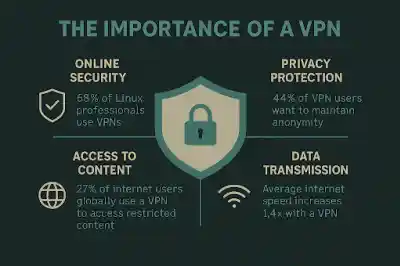
Mass Surveillance
Various governments across the world have been expanding their surveillance capabilities. HTTPS encryption protects your data but exposes your IP address and other communication details, leaving data protection incomplete without a VPN. VPNs obscure this layer.
ISP Practices
The practice of ISP traffic throttling persists through different types of network traffic. The encryption process, together with packet obfuscation, protects your data from ISP monitoring.
Remote Work & Administration
SSH remote server admins who need to manage their infrastructure through SSH rely on VPN connections for stronger data protection and reduced exposure.
Geo-Access for Professionals
Linux professionals who require worldwide testing environments benefit from VPN technology to access region-specific content or services.
Choosing the Right VPN for Linux Network Security
Security professionals base their VPN selection on functionality and its role in broader network security rather than user interface appearance, and they ignore advertisements about accessing international streaming content. The critical factors are:
- Select WireGuard whenever available, but implement OpenVPN as a protocol when compatibility becomes essential.
- Open-Source Clients: A transparent system earns more trust than proprietary black boxes.
- Users should verify VPN providers’ no-logs policies by checking both their terms and their reputation. A VPN provider's claim of no-logs operation remains ineffective without auditing processes.
- Linux users need providers who offer configuration files for Linux systems rather than focusing on Windows and Mac applications.
- Server Network: Wider coverage means lower latency globally.
WireGuard: The Game-Changer for Linux
The VPN protocol WireGuard has become the ‘rising star’ in Linux network security, according to LinuxSecurity.com, because of its advantages.
- OpenVPN performs poorly against WireGuard when benchmarked because it produces higher latency and lower throughput, according to benchmark results.
- Security: Uses modern cryptographic primitives with far fewer moving parts.
- Simplicity: Easy to audit; a sysadmin can read the entire codebase in a day.
- Kernel Integration: First-class citizen in Linux since kernel 5.6.
Linux users should select WireGuard as their VPN because it provides both high security and speed while maintaining complete transparency in their online activities.
Best Practices: VPN Configuration for Stronger Data Protection on Linux
Poor VPN configuration renders the most secure VPN systems useless. Some must-do practices:
-
Enable a Kill Switch
Prevents traffic leaks if the VPN disconnects. Implement via iptables or firewall rules. -
Check for DNS Leaks
You can verify DNS requests pass through the VPN connection using online tools or dig and nslookup commands. -
Keep Clients Updated
Users who employ OpenVPN or strongSwan for IPSec need to keep their clients up to date with the latest patches since these patches address security vulnerabilities. -
Avoid Free VPNs
LinuxSecurity explains that free VPNs generate revenue by stealing user information, and their encryption capabilities remain weak. -
Pair With Other Security Layers
The implementation of VPNs — paired with Firewalls (UFW, nftables), intrusion detection systems (Snort, Suricata), and SSH hardening practices — creates a layered approach to Linux data protection.
Frequently Asked Questions
Is Linux secure enough without a VPN?
Linux is one of the most secure operating systems around, but it can’t do everything. Once your data leaves your device, it’s exposed. A VPN fills that gap by encrypting traffic and hiding your IP address — something Linux on its own doesn’t cover.
What’s the best VPN protocol for Linux?
In 2025, WireGuard is the clear favorite. It’s fast, lightweight, and uses modern cryptography. That said, OpenVPN still has its place, especially if you need compatibility with older systems or existing setups.
Are free VPNs safe on Linux?
Rarely. Most free services pay the bills by logging your activity, selling data, or showing ads. Some also cut corners with weak encryption. If you’re considering one, read the privacy policy carefully and assume “free” comes with strings attached.
Does a VPN slow down Linux networking?
A little. Any VPN adds overhead, but with WireGuard the difference is usually so small you won’t notice it. For most users, the extra protection easily outweighs the minor speed hit.
Conclusion: VPNs as a Necessary Layer in Linux Security
Linux gives you a secure base. But without a VPN, network security gaps remain once traffic leaves the machine. That’s where a VPN fits in — encrypting data, masking identity, and blocking outside eyes from your network.
With surveillance, throttling, and remote work everywhere, a VPN isn’t optional. For Linux pros in 2025, it’s standard kit.
The LinuxSecurity.com community values openness and control. Open-source VPNs like WireGuard line up with that. Set it up right, pair it with solid practices, and your Linux box gets harder to compromise.
 PREVIOUS

 NEXT
NEXT


Powered By

Linux Security - Your source for Top Linux News, Advisories, HOWTOs and Feature Releases
QUICK LINKS
subscribe to newsletters!
Like staying secure? So do we.
Sign up for updates, tips, and alerts!