


Enhance Network Security With AIDE and CHKROOTKIT Integration
 Nov 20, 2004
•
Nov 20, 2004
•
 Brittany Day
3 - 6 min read


Topics Covered
Implementing an accurate security analysis into your network security toolkit is vital in ensuring your company is secure against any and all cloud security breaches that head your way. Linux AIDE and CHKROOTKIT are incredibly useful services that can help protect your data and network security. This article will discuss these two programs, how they benefit users, and how to integrate them into your security practices.
What is CHKROOTKIT? How Do I Set It Up?
CHKROOTKIT, or Check Rootkit, checks all parts of your company’s system for search rootkits or LKM trojans. Chkrootkit can detect any network security issues and adjust system binaries to prevent further problems from appearing. Once you have downloaded this service, you can find a list of detectable network security threats on any cybersecurity project’s homepage. To configure chkrootkit, you will need to enter the command "tar xzf chkrootkit.tar.gz" and the new directory "cd chkrootkit-0.43/”. You will be ready to launch the program but test it straight away with the function "./chkrootkit" to prevent any problems in data and network security from arising.
There are many different controls and inquiries you can utilize on Chkrootkit by inputting “ps,” “tar,” or “ls” binaries, all of which can help you detect any attacks in network security that your company may be facing. Type the command "./chkrootkit ps tar ls sniffer" as a root user so you can see if your system is infected:
|
bash-2.05b# ./chkrootkit ps tar ls sniffer ROOTDIR is `/' Checking `ps'... not infected Checking `tar'... not infected Checking `ls'... not infected Checking `sniffer'... eth0: not promisc and no PF_PACKET sockets |
You can also test the integrity of your binaries using "./chkrootkit -x | more". If you only want to check a certain part or directory within your system, type in "./chkrootkit -p /home/" or "./chkrootkit -p /home/:/mnt." Pay attention to the messages provided by the chkrootkit so that you can see what isn’t working properly or functioning as it should within your system. Here are some of the outputs that chkrootkit could provide (see image below).
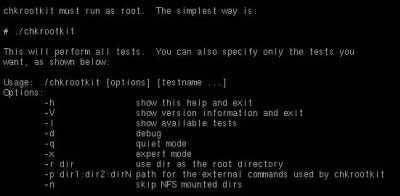
The complete list of the functions allowed from Chkrootkit.
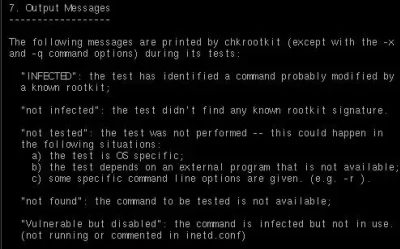
Chkrootkit's output messages.
What Is Linux AIDE? Why Should I Use It?
Linux AIDE, or Advanced Intrusion Detection Environment, is a powerful and useful intrusion detection software that can replace Tripwire and check the integrity of your files. AIDE functions can improve Tripwire actions to help your company’s data and network security. AIDE helps verify all files you interact with and notifies you of changes to a file’s configurations and filtering. See if your system supports Linux aide, and if so, download and compile the services from freshmeat.net: GNU Flex, GNU Bison, GNU Make, ANSI C-Compiler, and Mhash library.
Critical Component of AIDE: Mhash Library
Mhash library is quite helpful on various systems, as it can verify problems within your AIDE package utilizing the command "./configure" so you can receive output messages:
|
checking for mhash_get_block_size in -lmhash... no configure: error: You must have libmhash properly installed. |
Ensure your Linux security patching "/usr/local/lib" is in the "/etc/ld.so.conf" file. If not, add "/usr/local/lib" to the end of the file, save, and run an “ldconfig”. If AIDE continues to prevent you from seeing the Mhash library, look at the "config.log" file in the main directory to understand the network security issues you are facing so you can take care of it.
Compiling AIDE
Download the sources and compile the package: "tar xzf aide-0.10.tar.gz", "cd aide-0.10", "./configure", "make", "su root", "make install". AIDE will then locate the configuration file in the directory "$prefix/etc/" with the name "aide.conf". You can move this to your preferred editing site to set up AIDE configurations according to your company’s needs. Here are the three line types you should consider when setting up your AIDE:
- Configuration lines set configuration parameters and define/undefined variables.
- Selection lines indicate which files will be added to the database
- Macro lines define variables within the config file
Here is a compilation of various AIDE functions to keep in mind:
|
p: permissions i: inode n: number of links u: user sha1: sha1 checksum rmd160: rmd160 checksum |
g: group s: size b: block count m: mtime tiger: tiger checksum R: p+i+n+u+g+s+m+c+md5 |
a: atime c: ctime S: check for growing size md5: md5 checksum L: p+i+n+u+g E: Empty group |
Following AIDE manual guidelines, we can configure our files based on system requirements. Linux AIDE rules are not always valid for all systems, but it is a good idea to know all of the services for educational and demonstrative purposes in case you switch systems or need to help someone else configure their files. In the below image, we set up our rules, which unwind all controls based on what we prefer, and we give ourselves control over permissions, number of links, inodes, file size, md5 checksum, last time change, sha1 checksum, and more.
AIDE Functions and How to Execute Them
You will need to build a database to check your system's integrity and the overall data and network security services implemented with AIDE. Use the command "aide --init" to database every file you selected with the configuration control. Move the AIDE database to a backup device to avoid compromising the system or database if something goes wrong. Update your system using the command "aide --update” as frequently as necessary. Suppose you have modified something in your AIDE database recently. In that case, it is a good idea to check the integrity of the service so that you can utilize security patching if your system is not fully protected following the changes. "aide --init” can verify your system and boot unsafe hosts. Compare files with integrals in the database using "aide --compare.”
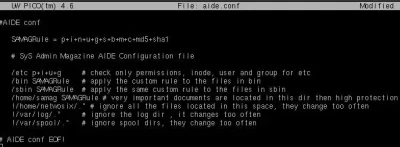
Our aide.conf
Final Thoughts AIDE and CHKROOTKIT for Digital Security
These network security toolkits focusing on security analysis are incredibly useful to configure within your system to ensure your company and its files are safe. Consider implementing either AIDE or CHKROOTKIT into your day-to-day data and network security so that you can concentrate on other aspects of your business rather than how to maintain your company's security. Linux AIDE has many functions that can help test the integrity of your system, while chkrootkit can check for any network security threat headed your way.
 NEXT
NEXT

Powered By

Linux Security - Your source for Top Linux News, Advisories, HOWTOs and Feature Releases
QUICK LINKS
subscribe to newsletters!
Like staying secure? So do we.
Sign up for updates, tips, and alerts!